
Tool comparison

EditablePPT vs Codia NoteSlide: both convert to PPT — so what's different?

Both tools turn PDFs and images into editable PowerPoint. The real difference: do you only want conversion, or do you also want AI to generate and redesign slides?

Full disclosure: we make EditablePPT, so we have a stake in this comparison. We've tried to be clear about strengths and weaknesses on both sides. Competitor details come from official sources, checked 2026-09-29.

The 4 things we look at

People care about different things, so there's no single best tool for everyone. Decide which of these matters most to you, then read on.

  1. 1. Can you actually edit it?

    Is the text in real text boxes, and can images be moved on their own — or is it one flat picture pasted on the slide?

  2. 2. How faithful is the text?

    Do font size, color, and position match the original, and does small, dense text come through correctly?

  3. 3. Where do you start?

    Do you already have finished slides, or only source material you need to turn into a deck?

  4. 4. How fast can you get going?

    How much do you need to learn, and how many steps until you have a usable PPT file?

Tool by tool

EditablePPT

Turns the slide images and PDFs you already have back into editable PowerPoint.

How it works
Upload an image or PDF, review the result online in a minute or two, fix text or move images, then download the PPTX.
Best for
Anyone with screenshots, image-only decks, or exported PDFs who needs to change a few words or swap an image.
Honest weakness
It currently handles PNG and JPG images (up to 8 MB each) and PDFs. Brush or outlined display lettering becomes a regular font, and dense small text is occasionally misread — give it a quick look against the original before downloading. It won't create content from scratch.
Choose it when
You mainly convert existing images and PDFs into editable PPT, want the simplest possible flow, and care a lot about faithful Chinese text.
Codia NoteSlide

Codia's slide tool. It converts PDFs and images, and can also generate and redesign slides.

How it works
Upload a PDF or image and convert it to editable PowerPoint, or use its generation and redesign features.
Best for
People who want AI generation or redesign alongside conversion, and teams that need an API for batch work.
Honest weakness
More features means more choices; if you only need conversion, you may not use most of them. We haven't yet run a systematic side-by-side test on the same set of images.
Choose it when
You want conversion, generation, and redesign in one tool, or your team needs to batch-process through an API.

The differences at a glance

CompareEditablePPTCodia NoteSlide
Starting pointImages or PDFs you already havePDFs or images, or generate from scratch
What you getA downloadable PPTX, with online editing before downloadAn editable PPTX
EditabilityRecognized text becomes text boxes; illustrations become separately movable imagesOfficially described as editable text and shapes
Chinese text & display letteringFaithful body text is a priority; display lettering currently becomes a regular fontChinese and English officially listed as supported
Learning curveJust upload — no new design tool to learnMore features: generation and redesign on top of conversion

A real example: a busy Chinese-language poster

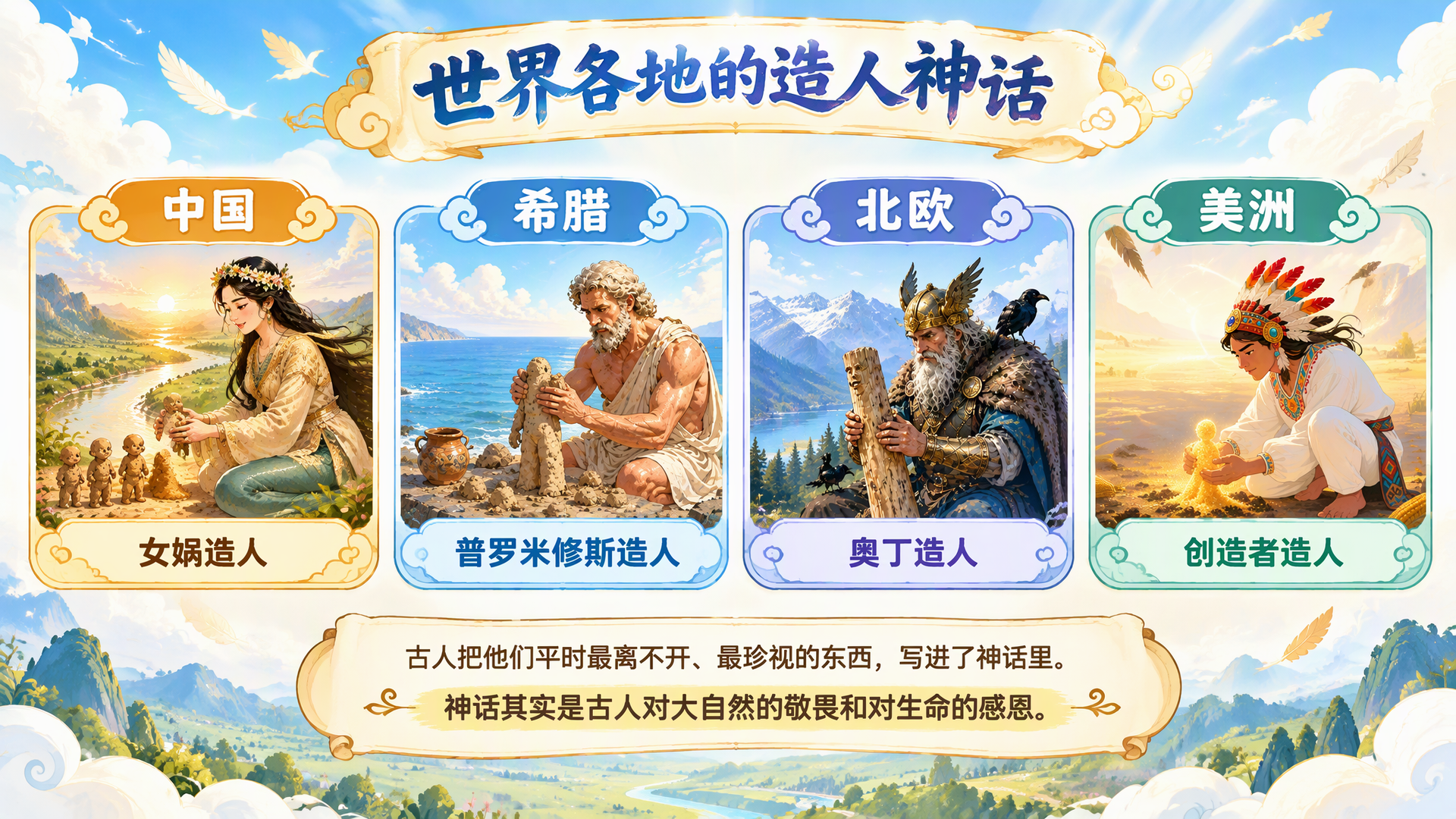
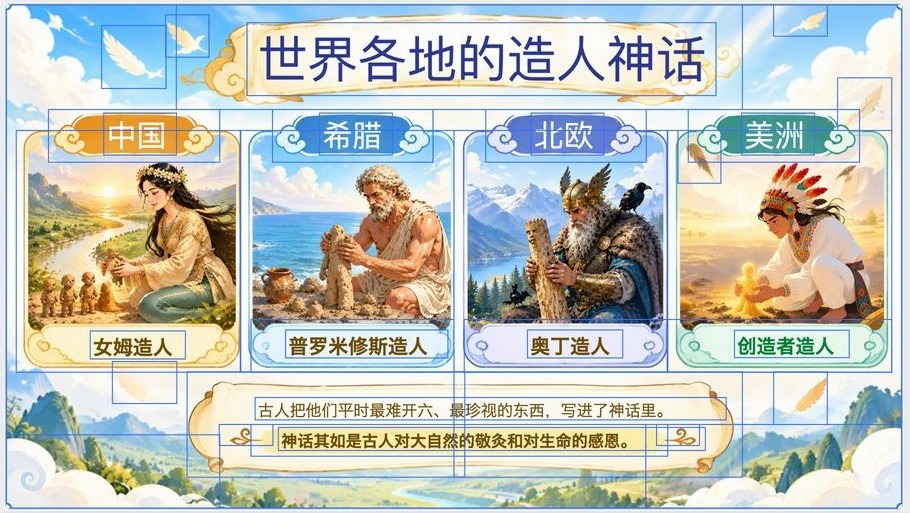
This 16:9 image has four character illustrations, a brush-lettered Chinese title, and small body text. On the left is the original; on the right is the EditablePPT result opened in the editor with everything selected (⌘A), with no manual fixes. Every blue box is a layer you can edit on its own.

Mythology-themed original: four character illustrations for China, Greece, the Nordics, and the Americas, under a brush-lettered Chinese title
Original image
The converted result selected in the EditablePPT editor: title, region names, card labels and body text are separate text boxes; illustrations and decorations are separate images, each with a blue selection box
EditablePPT editor: all 38 layers selected (11 text boxes, 27 images), no manual edits
  • All 11 pieces of text — title, region names, card labels and both body lines — are text boxes you can retype, recolor and resize.
  • The four illustrations, card frames, feathers and scroll ornaments became 27 separate images you can select, move and resize individually.
  • Not perfect: the brush-lettered title became a regular font, and a few characters in the text were misread. Because they're text boxes, each takes seconds to fix in the editor, but we think you should know up front.

Decide in 30 seconds

  • I just want a few images turned into editable PPT

    Either works; for the fewest steps, use EditablePPT.

  • I also want AI to redesign or generate new slides

    Use Codia NoteSlide — it has those features.

  • I'm not sure

    Convert the same image in both, open each PPTX, edit some text and move some images, and go with whichever feels better.

Try it with an image

Frequently asked questions

Does Codia also produce editable PowerPoint?

Yes. NoteSlide converts PDFs and images into editable PPTX files.

What's the main difference?

EditablePPT focuses on conversion alone, so the flow is shorter; NoteSlide does more, adding slide generation and redesign.

Which handles Chinese text better?

The most reliable answer is to try your own image in both. Faithful Chinese body text is a priority for EditablePPT, though display lettering currently becomes a regular font.

References

Competitor features are as described in official sources, checked 2026-09-29, and may have changed since. This page does not imply any partnership or endorsement.